


Telegram Channel is the integration of the Telegram application into Layanika, allowing businesses to receive and reply to customer messages through Telegram within a single omnichannel platform.

Connect Telegram Channel to Layanika #
Step 1:
Go to the Settings, then select Channel. Click Add Channel, then select Telegram.
Select how you want to connect your Telegram Bot :
- Create a New Bot
Choose this option if you don’t have a Telegram bot yet. - Connect an Existing Bot
Choose this option if you already have a Telegram bot.
Step 2:
To create a new Bot, follow the steps below:
- Send a message to BotFather with the following command:
Use
/mybotsif you already have a botOr use
/newbotto create a new bot
Then follow the instructions provided by BotFather until the process is complete.
Step 3:
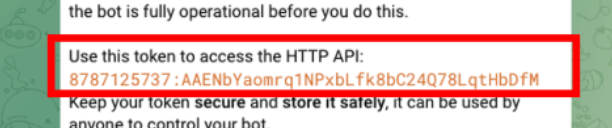
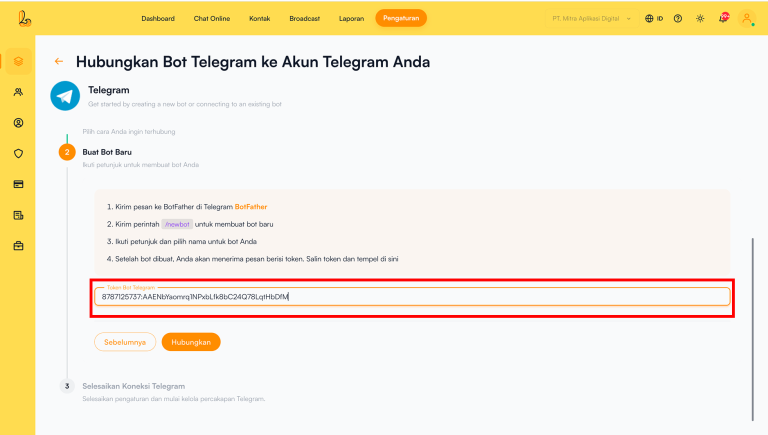
After receiving the token from BotFather, copy the token into the Telegram Bot Token field on the Layanika platform, then click Connect.
Channel Configuration #
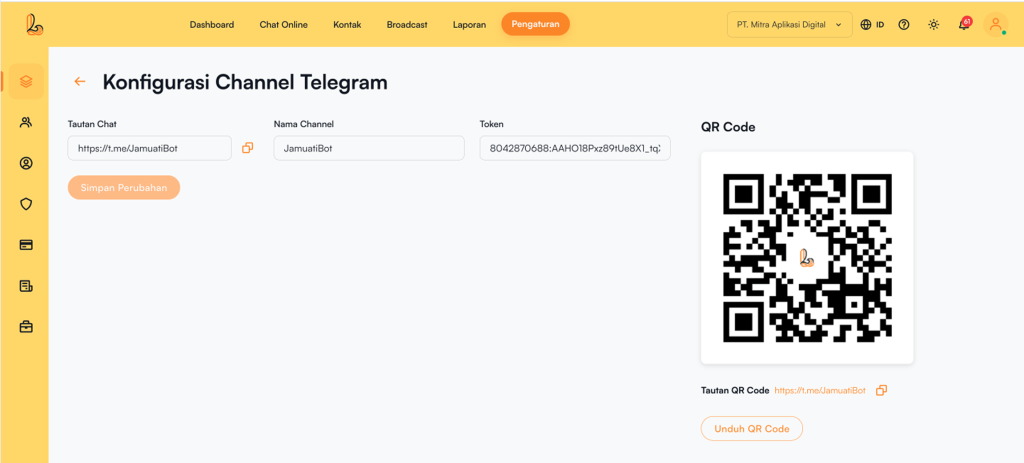
Users can update the channel name, copy the chat link, and download a QR code through the Configure Telegram Channel.
Click Manage on the Telegram channel that has been connected to Layanika. The system will then display the Configure Telegram Channelpage. Users will see the following information:
- Channel Name: The channel name can be updated as needed.
- Chat Link: This URL allows customers to easily start a conversation with your Telegram bot.
- Qr Code: You can use the QR code to share the chat link with your customers. Click Download QR Code to download it.
Delete Telegram Channel #
Click Manage on the Telegram channel, then select Delete Channel.


