


User Groups is a feature in Layanika used to organize users into specific categories based on their roles, functions, or divisions within an organization.
With user groups, access management and workload distribution can be handled in a more structured and efficient way.
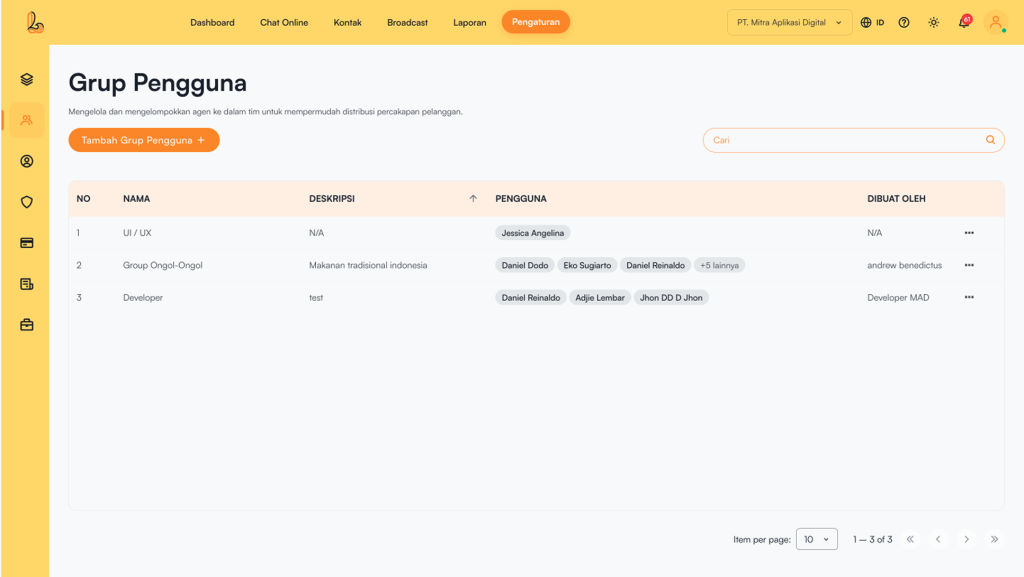
The User Group table includes the following information:
| Colom | Description |
|---|---|
| Name | The name of the user group |
| Description | A description of the group |
| User | A list of group members consisting of agents or users added to the group. |
| Created By | Displays the name of the user who created the group. |
| More | Menu for managing the group (edit or delete) |
a. Add User Group #
Click Add User Group, then group users into a team/group.
Fill in and complete the table below:
| Input | Description |
|---|---|
| User Group Name | The name of the group to be created. |
| Description | Additional details about the group |
| User | A list of group members consisting of agents or users added to the group. |
b. Edit Group #
To edit a group, select the group you want to modify from the list. Click the three dots on the right, then choose Edit After making changes, click the Save.
c. Delete Group #
Click the three dots on the right side of the group you want to delete, then select Delete.


