


Billing Information is used to complete company or user details required for the billing process, including invoice and tax invoice. This feature is accessible only to administrators. Ensure that all billing information is accurate and valid.
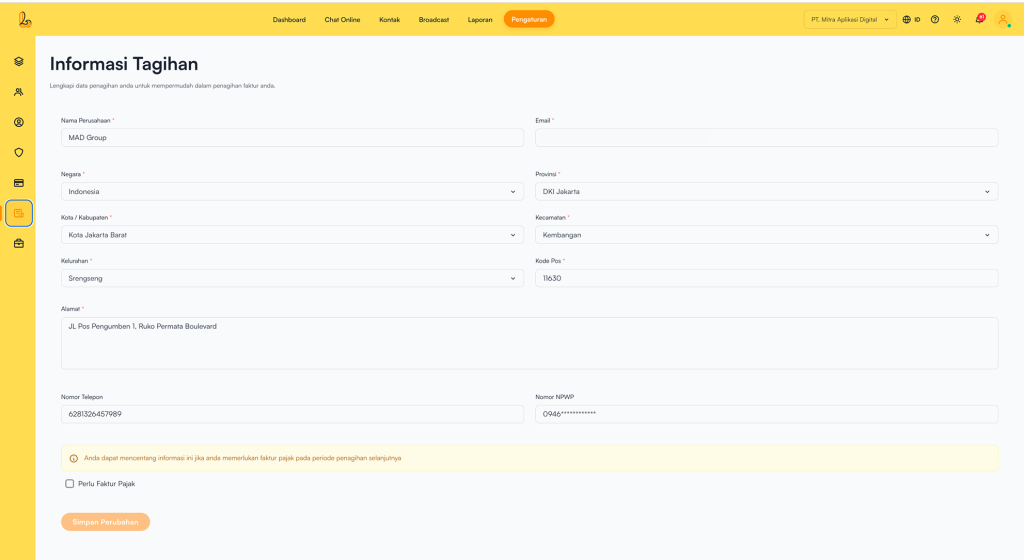
Go to the Settings >> Billing Information. The system will display the Billing Information, where you can fill in the required details such as:
| Colom | Description |
|---|---|
| Company Name | The name of the business or company |
| The email address used to receive invoices | |
| Country | Country of residence |
| Province | Province |
| City / Regency | City or regency |
| District | District |
| Subdistrict | Subdistrict |
| Postal Code | ZIP / postal code |
| Address | Full address |
| Phone Number | A reachable contact number |
| Tax Number | Tax identification number (optional, required if a tax invoice is needed) |
If users require a tax invoice for the next billing period:
- Content Tax Number.
- Check Invoice tax required.
Save Changes once everything is correct.


