

Instagram Channel is the integration of an Instagram Business account into Layanika, allowing users to receive and reply to customer messages (Direct Messages/DM) in a centralized omnichannel platform.

Create an Instagram Business Account #
To connect Instagram to Layanika, several technical requirements and access permissions must be met to ensure a smooth integration.
This integration uses Meta Platforms system, so it must follow their standards.
Main Requirements #
1. Instagram Business Account
- Must use an Instagram Business account (not a personal account)
- If your account is still personal, switch to Business through Instagram settings
2. Connected to a Facebook Page
- The Instagram account must be linked to a Facebook Page
- One Instagram account can only be connected to one Page
3. Admin Access
Must have admin access to:
- Facebook Page
- Instagram account
- Without this access, the integration will not be successful
4. Active Facebook Account
- Used to log in during the integration process
- Must have access to both the Page and Instagram account
5. Instagram Messaging Enabled
- Feature Messaging / DM must be enabled
- Ensure the account can receive messages from the public
Connect Instagram Channel to Layanika #
Follow the steps below to connect your Instagram Business Account to the Instagram channel in Layanika:
Step 1:
Go to the Settings, then select Channel. Click Add Channel, then choose Instagram.
Step 2:
Click Connect With Instagram then log in to your Instagram account. Grant the required permissions to allow Layanika to manage your account.
Channel Configuration #
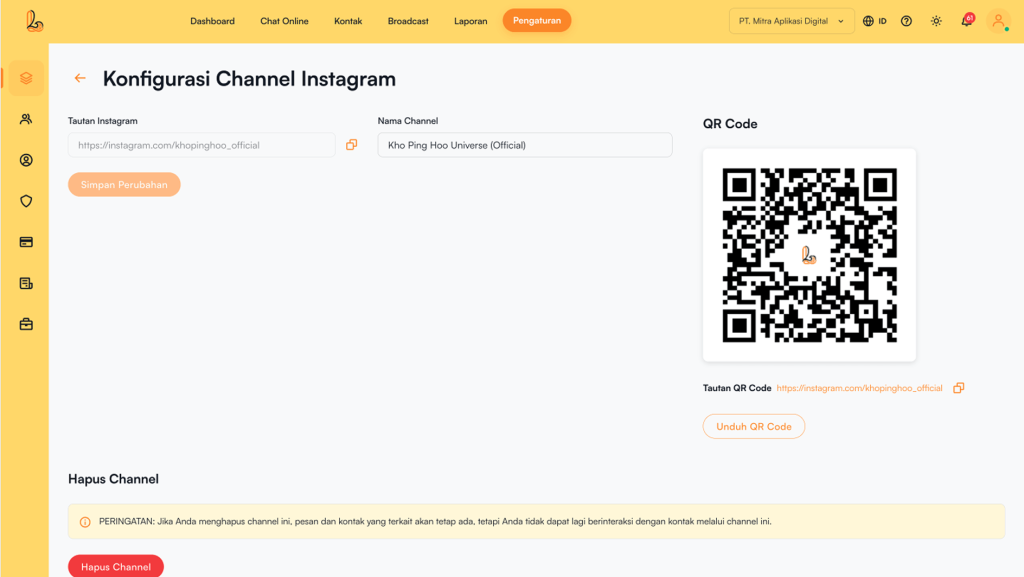
Users can update the channel name, copy the link, and download a QR code through the Instagram Channel Configuration.
Click Manage on the Instagram channel that has been connected to Layanika. The system will then display the Instagram Channel Configurationpage. Users will see the following information:
- Channel Name: The channel name can be updated as needed.
- Instagram Link: This URL allows customers to easily start a conversation with your Instagram Business account.
- QR Code: You can use the QR code to share the chat link with your customers. Click Download QR Code to download it.
Delete Instagram Channel #
Click Manage on the Instagram channel. The system will display the Instagram Channel Configuration. Then Delete Channel.


