


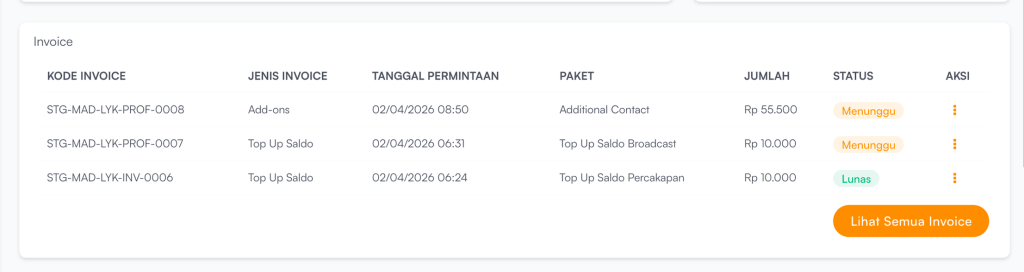
Invoice is used to view the complete history of payment transactions within the system, including:
- Subscription plan purchase
- Subscription renewals.
- Plan subcription (upgrade/downgrade).
- Buy add on.
- WhatsApp balance top-ups.
Each successful transaction is automatically recorded as an invoice.
WhatsApp Balance is used to send and receive messages through WhatsApp within the platform.
| Colom | Description |
|---|---|
| Invoice Code | A unique code for each payment transaction, used as the invoice identifier |
| Invoice Type | Indicates the type of transaction, such as:
|
| Request Date | The date and time when the transaction was created or initiated by the user |
| Package | Indicates the type of transaction, such as:
|
| Amount | The total payment amount, whether pending or already paid by the user |
| Status | The invoice payment status:
|
| More | Option to view invoice details or download the invoice |
To view all invoices, users can click Lihat Semua Invoice.


