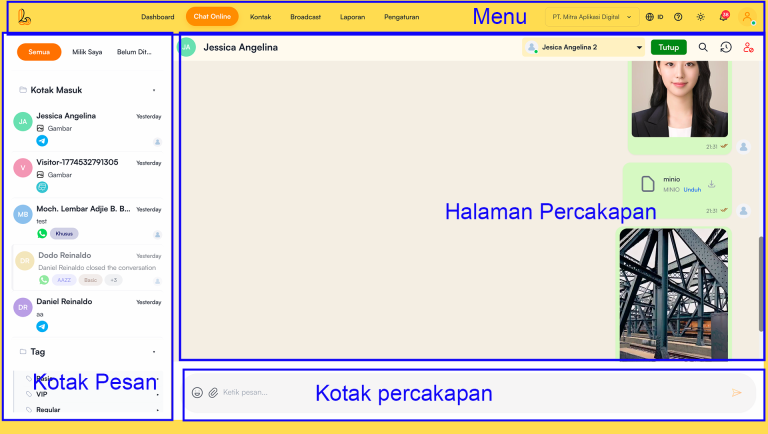


Main Menu #
The top section used for navigating between the system’s main features.
Functions:
Dashboard → Displays performance and activity summaries
Online Chat → Opens the conversation page (currently active)
Contact → Manages customer data
Broadcast → Sends mass messages
Report → Views statistics and performance
Settings → Configures the system
Additional Elements:
Account/Company selection
Language settings
Notification
User profile
Inbox Panel #
The left-side panel that contains the list of conversations.
Main Functions:
Displays all chats from various channels
Makes it easier to search and select conversations
Feature:
Filter Tabs:
All → All conversations
Mine → Chats assigned to the user
Unassign → Chats that have not been responded to
Contact/Chat List:
Contact/visitor name
Last message preview
Last message timestamp
Channel icon (WhatsApp, Telegram, etc.)
Tags & labels for contact segmentation
Conversation Page (Chat Area)
The main area in the center used to view conversation content.
Functions:
Displays chat history between the agent and the customer
Supports multiple message types:
Text
Image
Files/documents
Additional Features:
Message status (sent, delivered, read)
Contact information at the top
Action buttons such as:
Assign agen
- Close conversation
Message Input #
The bottom section used to compose and send messages.
Functions:
- Send real-time replies to customers
Feature:
- Input teks
- File/image upload
- Emoji
- Send message button